
The wall looks perfect at doors. Mid-set, a vertical stripe goes black for a second, comes back, then does it again. Or the whole surface dies while the processor still shows content on its preview. Someone says "we bought dual backup." Someone else asks which dual.
Power redundancy and signal redundancy protect different failure paths. Brochures often glue them into one slogan. Rental techs and church/FOH crews do not get that luxury when a cable is kicked or a PSU drops out during the keynote.
This guide sits next to our live peak vs average power post. That article answers how big the circuit and generator must be. This post answers what keeps pixels lit when one path inside the wall fails-and what still sits outside any "dual backup" checkbox.
Quick definitions (clear the name collision)
| Term | What it means | What it is not |
|---|---|---|
| Dual power / PSU redundancy | Extra power supply capacity (often N+1 or load-sharing) so one PSU fault is less likely to darken a cabinet or zone | Not a substitute for correctly sized breakers / generators – see peak vs average |
| Signal loop / loopback redundancy | Data path that can recover from the opposite direction if one Ethernet hop fails (typically last cabinet wired back to a second sender port) | Not protection against a dead content source or a failed processor |
| Dual receiving-card hot backup | Two receiving cards on a cabinet HUB; standby takes over if the primary card fails | Not the same as "we ran two Cat cables somewhere" |
| N+1 | One extra unit/path beyond the minimum needed to keep the protected layer running | Not a guarantee of seamless, invisible failover on every SKU |
| Black screen / blackout | Visible loss of image on all or part of the wall | Not the same as IMAG lip-sync lag – that is a latency stack (drafted separately) |
Industry language is blunt: redundancy is risk reduction, not a promise of zero downtime. If building power dies, or the media PC freezes, or nobody tested the backup path at load-in, the wall can still go dark.
Why this question is hot for buyers right now
Live-production forums keep posting the same symptom: a column of cabinets blinks black. First checks are almost always reseating the Ethernet jumper or a PSU-and whether a redundant cable was ever run. Rental guides repeat the same tip: enable a signal redundancy loop so one pinched Cat cable does not take the show.
Chinese RFQs use the same vocabulary – 双电源, 双信号 / 环路备份, 接收卡热备. The ask is practical: name the failure you fear, buy the layer that covers it, and test failover before doors. We are not inventing engagement scores; indexed forum advice, 2026 redundancy explainers, and CN engineering articles are enough heat for an honest OEM answer.
Failure map: match the symptom to the layer
| What you see on site | Often a power problem | Often a signal / card problem | Redundancy that usually helps |
|---|---|---|---|
| Entire wall dark; processor preview still OK | Main AC / distro / first feeder | Primary Cat from sender to first cabinet | Confirm power and primary data before blaming modules |
| One column / row blinks or drops | Cabinet PSU or DC feed on that chain | Loose inter-cabinet Ethernet / EtherCON | Signal loop backup; spare jumpers |
| One cabinet dark, neighbors fine | That cabinet’s PSU / breaker | That cabinet’s receiving card / HUB | Dual PSU and/or dual receiving card if the cabinet was built for it |
| Soft tear / one section a frame behind | Rarely PSU alone | Mixed firmware, bad hop, mapping | Consistent cards + tested topology (also see latency / refresh guides) |
| Wall dark and venue lights flicker | Facility / generator sag | Secondary | Fix upstream power – wall dual PSU will not invent volts |
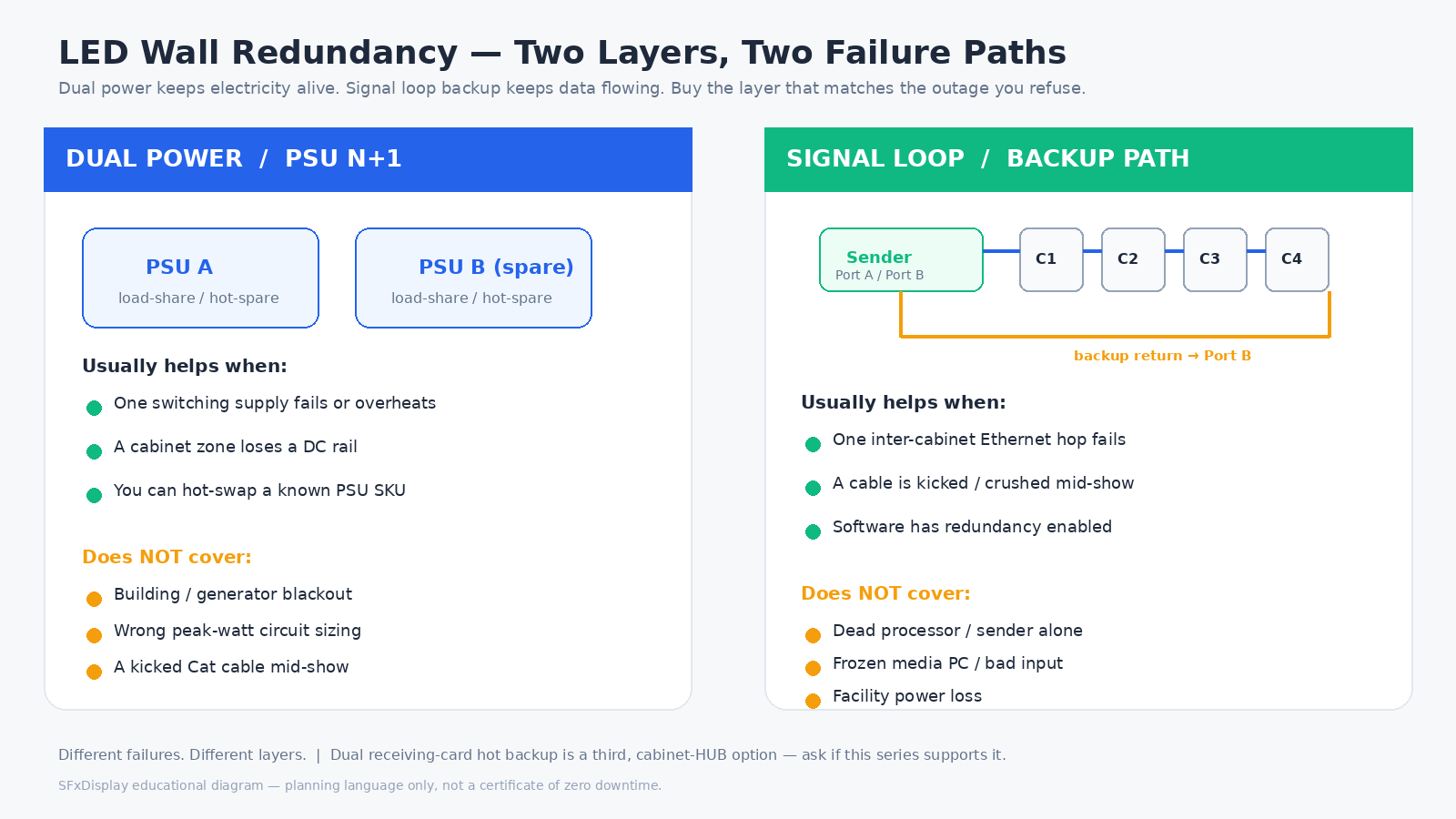
Use the table as a decision map, not a guarantee map. A loop cable does not revive a dead processor. Dual PSUs do not fix a crushed Cat6 under a road case.
Dual power: what it covers
Inside a rental or fine-pitch cabinet, modules run from low-voltage DC. Switching supplies fail more often than buyers expect: heat, fans, capacitors, road vibration, and loads that swing with content.
Ask in writing for:
- N+1 / load-sharing PSUs – spare capacity so one supply can drop while the cabinet (or zone) stays alive, with a practical hot-swap path if the mechanics allow.
- Independent AC feeds where the site supports them – facility design, not only a cabinet checkbox.
- Monitoring – voltage / temperature so a dying supply is swapped at changeover, not mid-keynote.
Dual power does not replace peak-watt circuit sizing (peak vs average, festival checklist), fix a building blackout, or hide a dead module – you still need spares and a service route (front vs rear, maintenance). For touring fleets, ask whether the same PSU SKU is shared across the pitches you stock and how long a field swap takes.
Dual signal: loop backup and receiving-card backup
LED cabinets usually daisy-chain data over Ethernet from a sending card / processor. One bad jumper can black everything downstream. That is why loop topology exists.
Signal loop (loopback) redundancy
Typical rental practice: Port A feeds the first cabinet and walks the chain; a second cable returns from the last cabinet to Port B; software enables redundancy so one middle-hop failure can recover from the opposite direction. Rental guides keep repeating this for "column blinks then recovers." It is cheap compared with a dark keynote – if the second cable is actually run and enabled.
Limits: Loop backup protects transport faults. It does not fix a frozen sender, a bad HDMI/SDI input, or a media-server crash.
Dual receiving-card hot backup
Some cabinets accept two receiving cards on one HUB so a standby can take over. Ask whether this HUB supports dual-card hot backup; whether spare cards match model and firmware; and where calibration lives (card vs module flash) so a swap does not leave a bright patch. Do not treat a control-brand name as redundancy – write the topology and test.
Long runs: copper vs fiber (sister decision)
Cabinet-to-cabinet copper is normal inside a wall. Long or noisy building runs often move to fiber. Redundancy still means two independent paths, not two cables in one crushed loom. Fiber is distance / isolation – not a free substitute for loop testing.
Processor and source: the layer brochures skip
A wall can be "fully dual" on PSU and Cat cables and still go dark if the only processor fails, the only content PC reboots, or mapping was never saved after a card change. Mission-critical rooms sometimes segment a large wall across more than one controller; keynotes sometimes keep a tested backup input. Rental one-nighters often accept more risk – then spare jumpers, spare cards, and a known loop setup become non-negotiable. Write the outage you refuse: a brief IMAG flash is a different budget from "never lose the CEO wall."
RFQ checklist (copy into the PO)
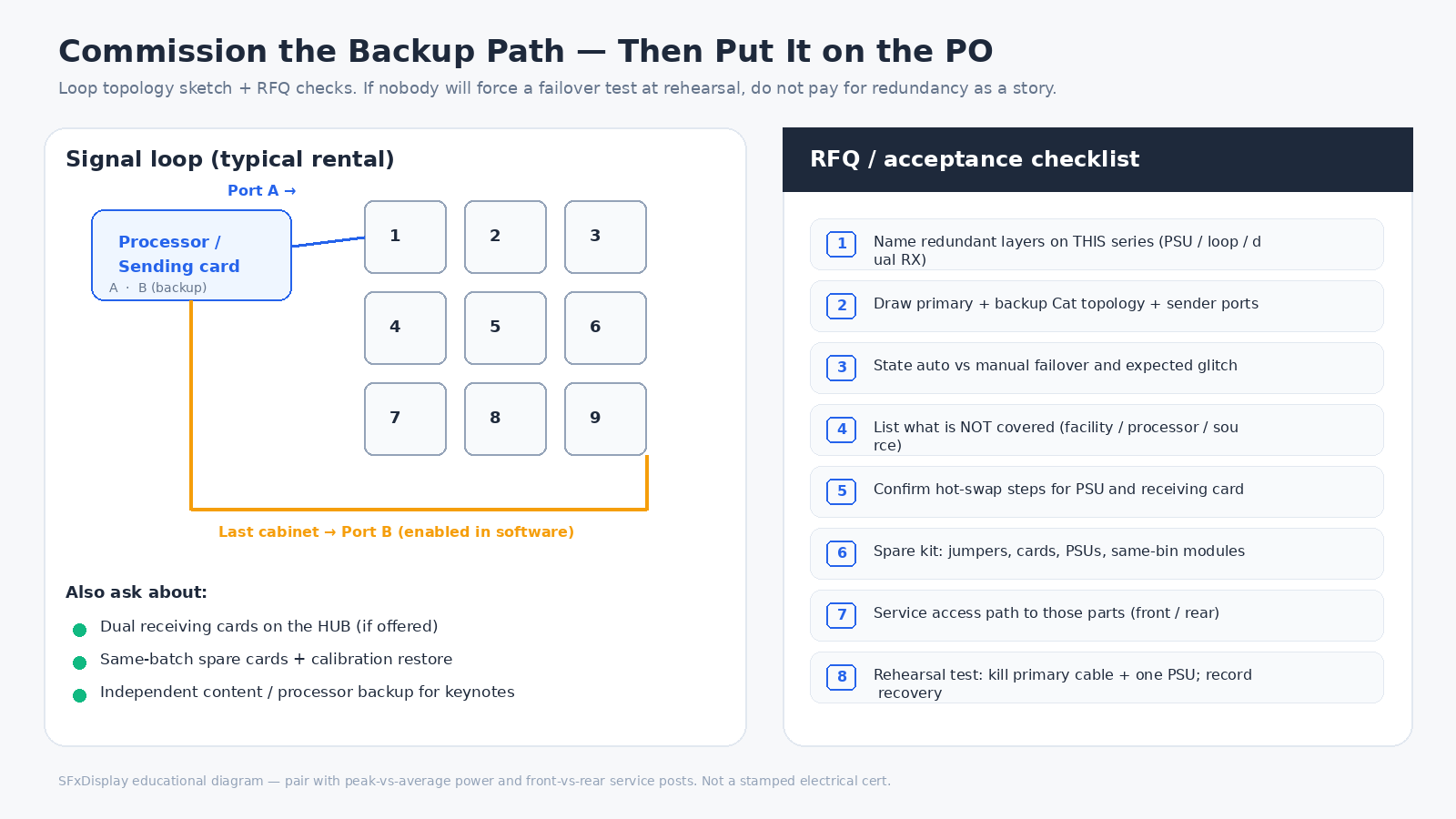
Ask the factory / integrator for written answers, not brochure slogans:
- Which layers are redundant on this exact series: PSU (N+1 / load-share?), signal loop, dual receiving card, dual firmware / config / calibration storage.
- Topology drawing: primary Cat path, backup return path, which sender ports, how many cabinets per chain.
- Failover behavior: automatic vs manual; whether a visible glitch is expected; who owns testing at commissioning.
- *What is not covered:* facility AC, generator, processor, content source – name the owners.
- Hot-swap mechanics: can a PSU or receiving card be swapped mid-event with the rest of the wall live? Isolation steps? Torque / connector notes.
- Spare kit: jumpers, EtherCON tails, same-batch receiving cards, PSUs, modules – see maintenance.
- Service access to reach those parts without tearing the set – front vs rear.
- Acceptance test: force a primary cable disconnect and a PSU kill on a non-audience wall section during rehearsal; record recovery. If nobody will run that test, do not pay for "redundancy" as a story.
Cabinet geometry and locks still matter on the same truck – 500×500 vs 500×1000 and soft vs hard connection – but locks do not replace a tested data loop.
What SFxDisplay can help with (honest scope)
We build rental and fixed LED cabinets and can help specify cabinet-level power options, receiving-card options, and spare kits that match church, rental, and stage jobs. We can document recommended chain lengths and backup wiring practices for the series you buy.
We cannot certify your venue mains, generator hire, or a third-party processor / media-server failover from a PDF. Bring the outage you care about to the RFQ, ask for the redundancy layers in writing, and prove failover at load-in.
Browse rental series and how to choose an LED display as starting points, then paste the checklist above onto the PO.
Cameras still need honest refresh language – see 3840Hz vs 7680Hz – but higher Hz does not rescue a missing backup Cat cable.
Bottom line
"Dual backup" is three different purchases wearing one slogan. Dual power covers supply-side faults inside the protected electrical path. Signal loop backup covers daisy-chain cable faults. Dual receiving cards cover card-level faults when the HUB is built for them. None of those layers invents building power or a second content source.
Buy the layer that matches the failure you refuse, write it into the PO, and force a failover test before the audience arrives. That is how redundancy earns its line item.
—