
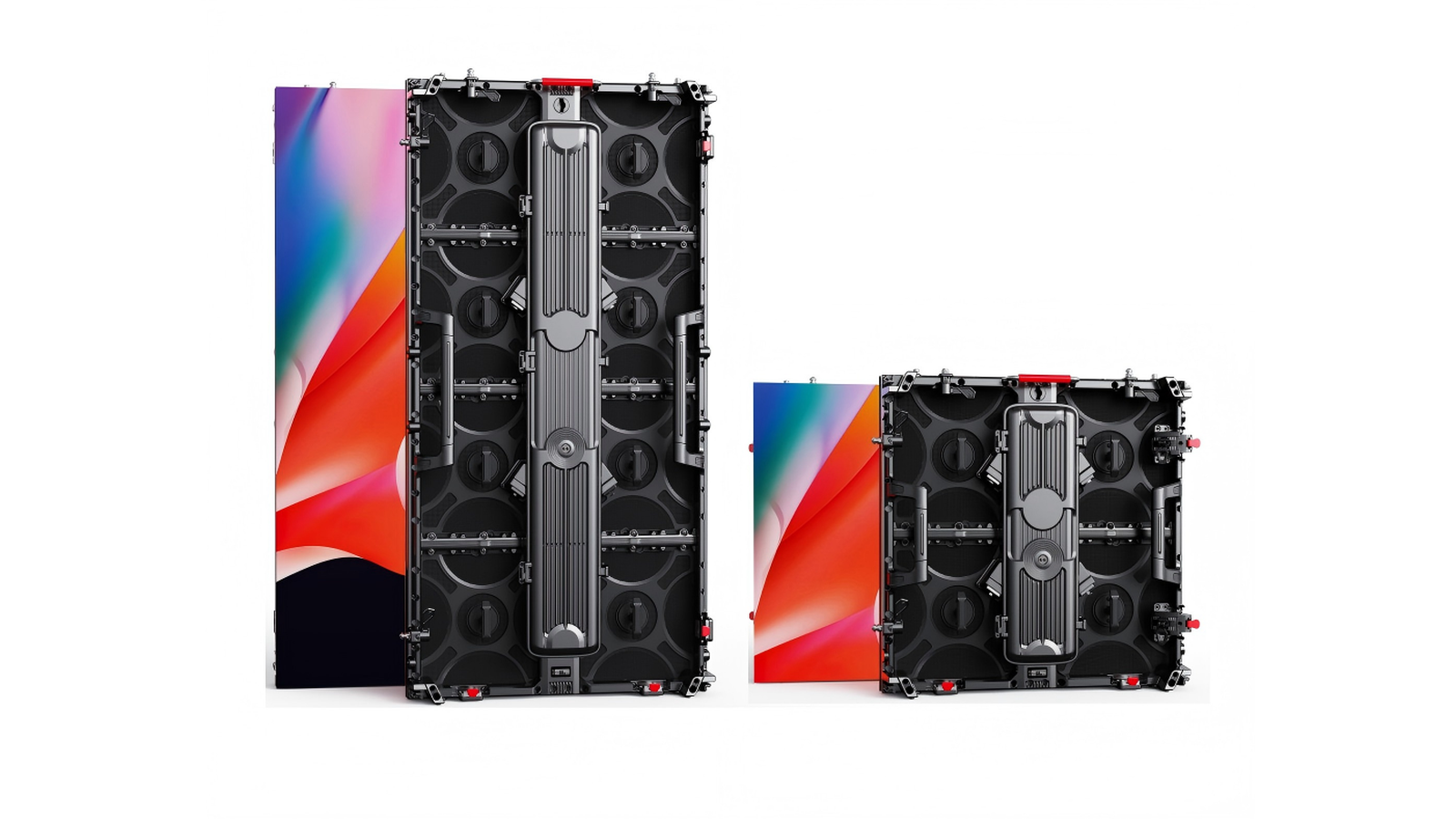

The quote says "3% spare modules included" and, in smaller type, "hot-swap ready." Procurement hears insurance. The warehouse hears cost. The crew chief hears: will we still have a picture at doors if one tile dies at soundcheck?
Those two phrases are not the same job. Spare percentage is fleet inventory math – how many matched parts you keep so a dead module, PSU, or cable does not end the night. Hot-swap is a cabinet / electrical design claim: can a trained tech pull a failed module (or sometimes a PSU / receiving card) while the wall stays lit, or do you still cold-swap after a section power-down?
This post owns what to stock, how much is an honest planning band, batch matching, reorder lock, and when hot-swap is worth verifying on the RFQ. Our live front vs rear service post owns the access route (how you reach the parts). Soft vs hard locks own cabinet connection. Festival and hang posts own weather and structure. Here we answer only the CapEx question rental buyers keep asking after the first mid-show failure.
Quick definitions (clear the name collision)
| Term | What it means | What it is not |
|---|---|---|
| Spare module % | Extra LED modules held against the same product / batch, usually expressed as % of screen area or of panel count | Not free brightness; not a warranty substitute |
| Companion kit | PSUs, receiving cards, data/power cables, locks, connectors stocked beside modules | Not "whatever is left in the crate" |
| Same-batch / bin match | Spares from the same production run (or documented matched bins) so white / color stay close after a swap | Not "any compatible pitch from next quarter" |
| Cold swap | Replace after powering down a section or the wall; still the rental default | Not failure – just the common recovery path |
| Hot-swap | Purpose-built path that lets a module (and sometimes PSU/card) come out while content continues | Not a sticker; not automatic on every front-service cabinet |
| SKU lock / reorder window | How many years the factory can re-supply the same module part number | Not the same as warranty length |
Industry language is blunt: front service shortens the path to the part; spares decide whether the part is in the building.
Why this question stays hot for buyers
2026 rental buying guides still put spare parts strategy next to pitch, weight, and setup speed – because the panel price is only part of the season cost. Mid-event module deaths, blown PSUs at load-in, and "compatible" modules from a later batch that look pink on camera are the stories that burn CapEx after the PO is signed.
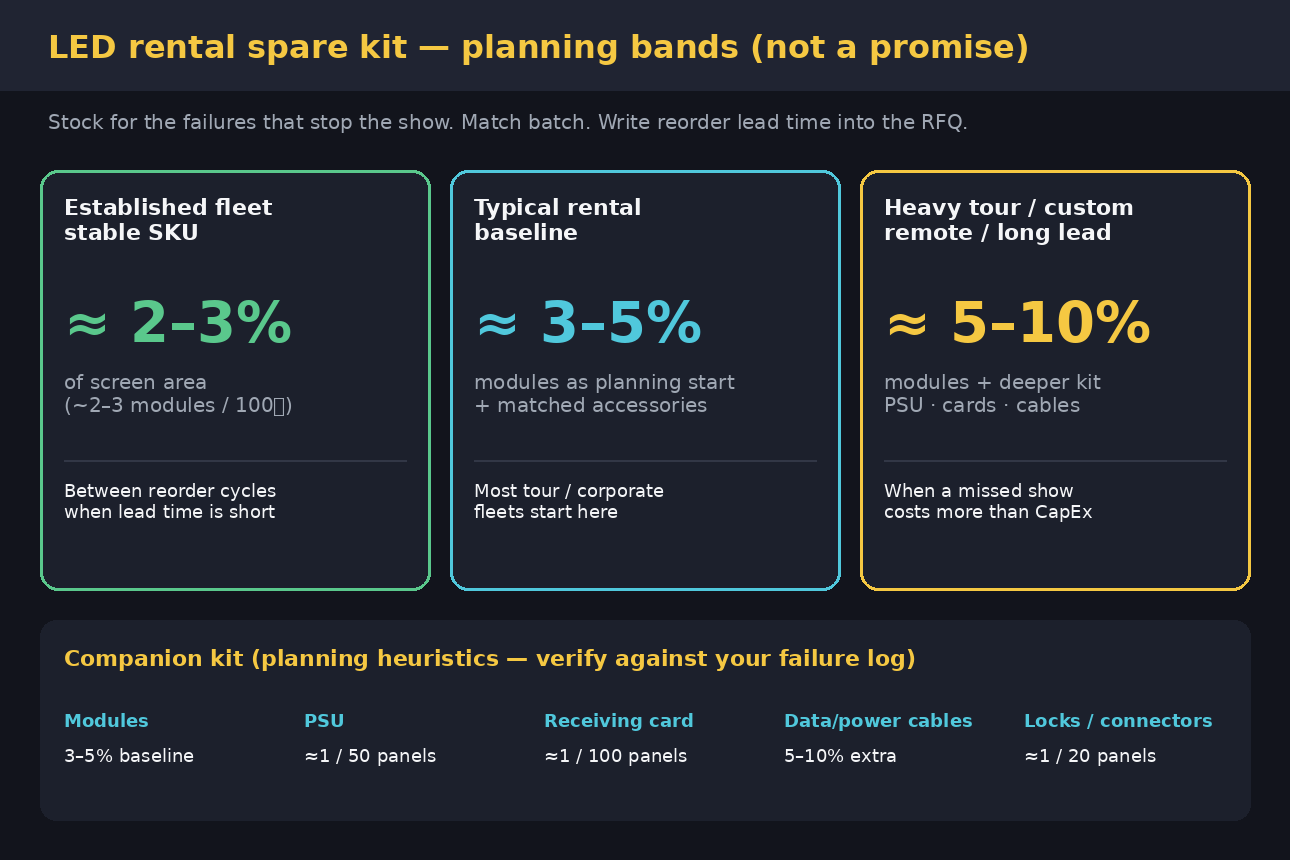
OEM FAQs and spare-planning pages keep repeating the same planning bands: roughly 2-3% of screen area for established fleets between reorder cycles; 3-5% modules as a typical rental starting kit; 5-10% when touring is hard, lead times are long, the SKU is custom, or a black wall costs more than the extra modules. Hot-swap writeups target festivals and concerts where stopping the wall mid-show is unacceptable.
CN trade language stays durable: 备件比例、同批次备件、热插拔电源/接收卡/模组. Integrator forums keep asking what to keep in the truck – the same anxiety that makes an honest kit table useful on an RFQ.
We are not inventing engagement scores. Indexed 2026 rental guides, June 2026 spare-planning pages, OEM 2-3% FAQ language, and durable CN 备件/热插拔 explainers are enough heat for an honest OEM answer. Live Google PAA and social spike counts were not scraped this pass – so we do not invent them.
Honest spare % bands (planning heuristics, not a promise)
Use bands as starting points, then tighten with your own failure log, utilization, and supplier lead time:
| Fleet situation | Module planning band | Why this band |
|---|---|---|
| Established fleet, stable SKU, short reorder | ≈ 2-3% of screen area (~2-3 modules per 100㎡ as a common FAQ-style guide) | Covers operational failures between reorder cycles when you can restock fast |
| Typical rental / corporate-tour baseline | ≈ 3-5% modules | The number most 2025-2026 spare guides treat as a starting kit, not a trophy |
| Heavy touring, custom shapes, remote venues, long import lead | ≈ 5-10% modules (sometimes higher for one-off custom) | Missed-show risk and freight time dominate; CapEx is cheaper than air-freight panic |
Honesty rules:
- % of what? Write area or panel count on the PO – "3%" without a base is marketing fog.
- Modules alone are not a kit. A dark cabinet is often a PSU or signal fault, not a dead LED.
- More is not always smarter. Excess modules still age (light decay / storage risk). Prefer matched depth + documented reorder over a silent warehouse of orphans.
- Your log beats our table. If one PSU model fails every third outdoor weekend, stock that PSU deeper than the brochure ratio.
Companion kit: what else belongs beside the modules
Planning heuristics that show up repeatedly in 2025-2026 rental spare guides (treat as RFQ starting language, then adjust):
| Item | Planning heuristic | Why it earns a line on the PO |
|---|---|---|
| LED modules | 3-5% baseline; 2-3% lean / 5-10% heavy | Highest visual impact when they fail |
| Power supplies | ≈ 1 per 50 panels (adjust to your PSU topology) | One PSU can darken a cabinet or a section |
| Receiving cards | ≈ 1 per 100 panels | Rare, but a wrong or missing card stops recovery |
| Data / power cables | 5-10% extra | Lost and damaged more often than "broken" |
| Locks / connectors / small hardware | ≈ 1 per 20 panels (or a sealed tour bag) | Dropped at load-in; cheap until you do not have one |
| Tools / magnetic pullers / access hardware | On the truck, not in a different city | A spare module without tools is still downtime |
Batch and SKU lock (non-negotiable on serious fleets):
- Ask for same production batch (or documented bin match) for spare modules shipped with the order.
- Ask how many years the factory will keep the same module part number reorderable. A rental inventory often runs 6-8+ years; a SKU that vanishes in year three turns one dead tile into a mismatched wall or a write-off.
- Store spares cool, dry, anti-static; use FIFO so the oldest matched modules rotate into the truck first.
Hot-swap vs cold swap (show continuity)
| Path | What the crew experiences | When it is enough | What to verify |
|---|---|---|---|
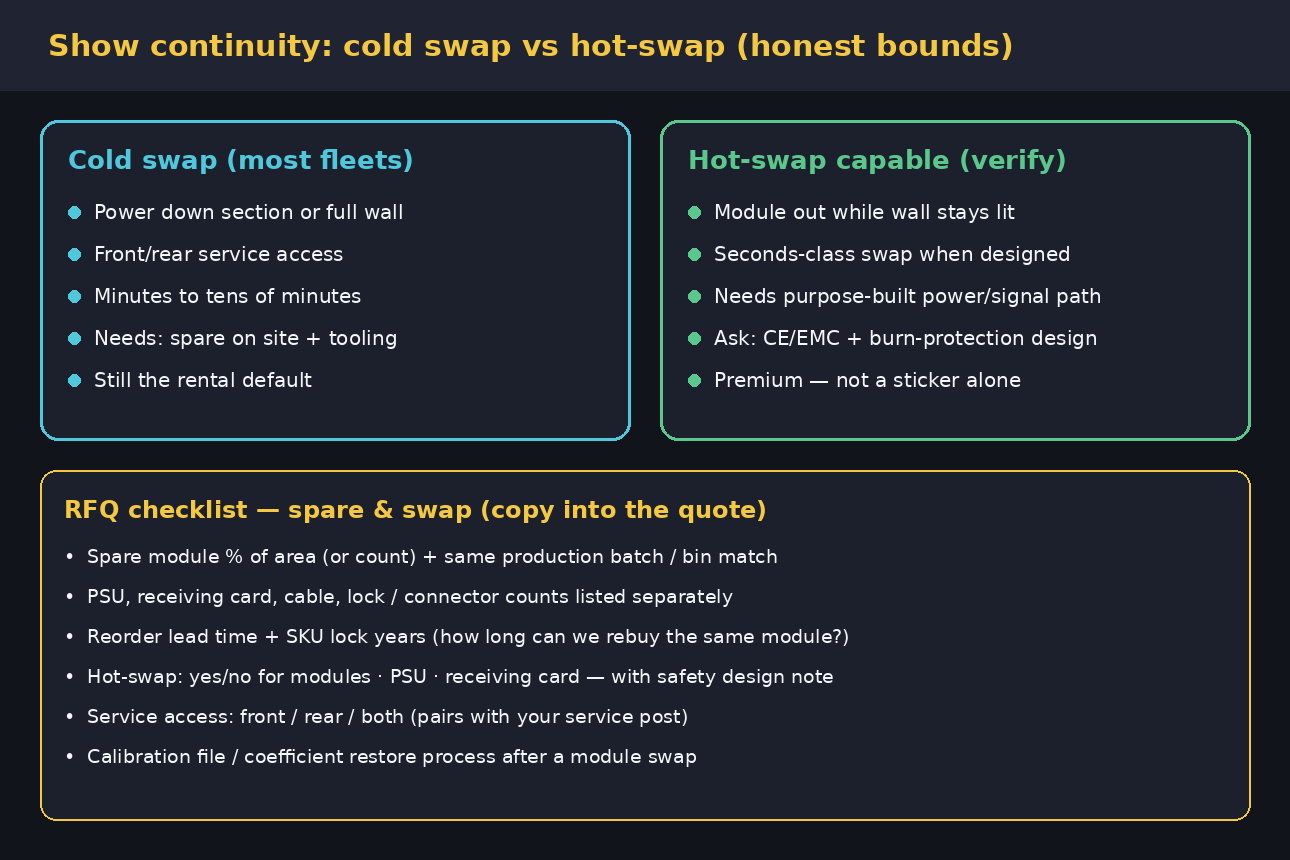
| Cold swap | Power down section/wall -> open service path -> replace -> power up -> check map/calibration | Most corporate, church, and many festival walls | Access (front/rear), spare on site, time to doors |
| Hot-swap (module) | Failed module out, good module in, wall stays displaying | Concerts / festivals / broadcast where blackout is unacceptable | Purpose-built power & signal path, burn/short protection, trained procedure |
| Hot-swap PSU / receiving card | Swap those assemblies without killing the whole wall | High-duty rental where electronics fail more than LEDs | Same – design claim, not brochure synonym for "front service" |
Honest bounds:
- Front service ≠ hot-swap. Magnetic modules speed cold swaps; they do not automatically allow live pull.
- Hot-swap ≠ "no spares needed." You still need a matched spare in the flight case. Hot-swap only shortens the recovery clock.
- Marketing "seconds" vs field minutes. Seconds are best-case with the spare in hand, correct orientation, and a designed interface. Diagnosis, ladder time, and validation still add minutes.
- Safety & EMC. Live work on powered assemblies needs a design that will not arc, brown-out neighbors, or fail CE/EMC assumptions. Ask for the design note, not only the feature bullet.
Pair this section with front vs rear service so the RFQ covers access + inventory + swap mode in one pass.
After the swap: color, map, and calibration files
A technically correct spare can still look wrong on camera if:
- The module is from a different batch (white balance / brightness shift).
- Cabinet map / receiving-card config was not restored.
- Calibration coefficients were never backed up – or never re-applied to the replacement.
Practical handover language (even if full pixel calibration is a sister topic):
- Backup controller config + calibration database at ship and after each major rebuild.
- Document the restore steps for a single module / card swap.
- For camera-critical walls, plan a quick white / grey ramp check after every spare install – not only after the first hang.
When a lean kit is still honest
You do not always need 10% modules:
- One indoor church wall with a local supplier who can overnight a matched module.
- Low annual hours and a stable SKU already proven in your warehouse.
- Events that can tolerate a masked bad tile for one night with a known next-day swap.
Lean kits fail when lead time is weeks, the SKU is custom, the tour crosses borders, or the show cannot go dark. Then the "expensive" spare shelf is the cheap insurance.
RFQ checklist (copy onto the PO)
Ask every supplier the same lines so quotes are comparable:
- Spare modules: % of area or exact count; confirm same batch / bin match.
- Companion kit: PSU count, receiving-card count, data/power cable %, locks/connectors.
- Reorder: lead time today; SKU lock years; single-item reorder without MOQ.
- Hot-swap: modules yes/no; PSU yes/no; receiving card yes/no – plus a short safety / EMC design note.
- Service access: front / rear / both (link to your access post).
- Recovery docs: map files, config USB, calibration backup, and the module-swap restore procedure.
- Storage: how spares ship (anti-static, labeled batch ID).
- Total delivered cost: panels + shipping + duties + spares, not panel price alone.
Related reading (live SFxDisplay)
| Post | What it owns vs this article |
|---|---|
| Front vs rear service | Access route to modules/PSU/cards – not spare count |
| Soft vs hard connection | Cabinet locks for touring rebuilds |
| Outdoor festival checklist | Full tour list: weather, power, hang, crew |
| 500×500 vs 500×1000 | Cabinet format that changes panel count math |
| Power & signal redundancy | Dual-path architecture – different from inventory % |
| 4K hang weight | Structure / WLL – not spare shelf depth |
| How to choose | Broad selection framing |
| Rental series | Product starting point after the kit is clear |
| Rental P2.6 / P2.9 / P3.91 | Pitch once fleet ops are planned |
SFxDisplay honest boundary
We build and quote rental cabinets for buyers who need matched spares and clear service paths, not brochure poetry. We will put module %, companion counts, batch ID, and hot-swap yes/no on the quote when you ask. We will not invent a universal failure rate for your climate, crew, or generator. We will not call every magnetic front-service cabinet "hot-swap." If your show cannot go dark, say so early – that changes kit depth and design checks more than it changes the pitch number.
Browse rental series and how to choose an LED display, then paste the checklist onto the PO.
Bottom line
Spare % is how you keep a picture when something dies. Hot-swap is how fast you restore it without blacking the wall – when the cabinet is actually designed for it. Start around 2-3% / 3-5% / 5-10% modules by situation, add PSUs, cards, and cables as a real kit, demand same-batch spares and a SKU reorder window, and verify hot-swap as a design claim next to front vs rear service. Write all of it into the RFQ before the first load-in teaches you the hard way.
—


1 Comment
[…] live outdoor festival checklist owns weather, nits, IP, wind, and crew tech habits. Our live rental spare parts post owns what to stock. This post owns only one thing: what actually moves the load-in clock so […]