
The quote arrives with three numbers stacked like a trophy: 3840Hz · 1/32 scan · 60 fps. Sales says the higher fractions win. The IMAG director asks why the phone still shows bands. Someone else wonders whether "60 fps" means the wall redraws sixty times – or three thousand.
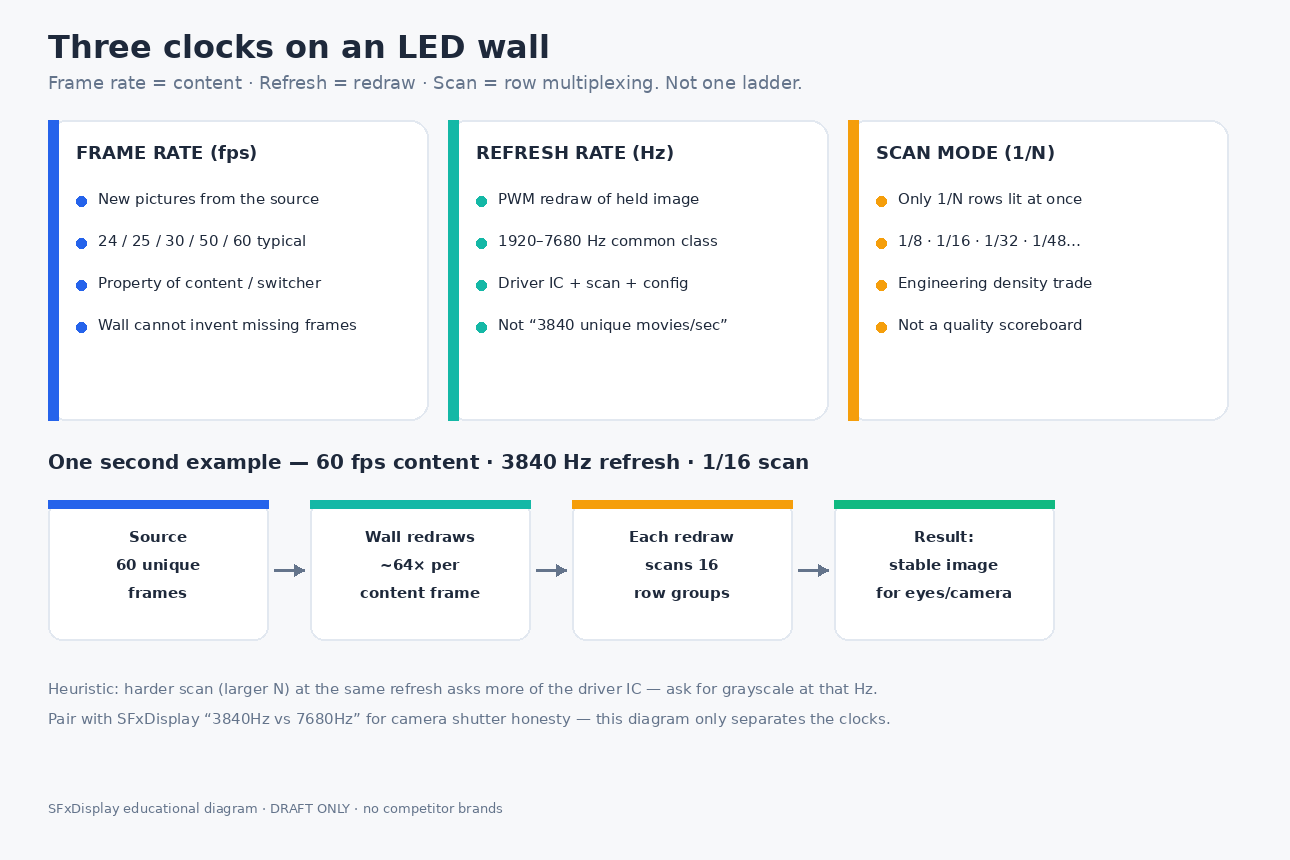
Those three numbers are three different clocks. Frame rate belongs to the content. Refresh rate belongs to the panel PWM / driver electronics. Scan rate belongs to how the module multiplexes rows of LEDs. Mixing them into one "bigger is better" ladder is how rental fleets overpay for the wrong line, and how camera jobs fail with a "high Hz" PDF in hand.
This post owns the three-clock glossary and the scan-fraction myth. Our live 3840Hz vs 7680Hz post owns which refresh number cameras actually need and how factories fake Hertz. Our HDR vs SDR post owns dynamic range. Our Sep-15 IMAG latency draft (awaiting confirm) owns control delay – not scan architecture. Here we answer only: what each number means, why 1/16 vs 1/32 is not a quality scoreboard, how scan constrains achievable refresh, and how to RFQ all three honestly.
Quick definitions (clear the name collision)
| Term | What it means | What it is not |
|---|---|---|
| Frame rate (fps) | How many new images the source delivers each second (24 cinema, 50/60 live, etc.) | Not the panel’s internal redraw speed; a wall cannot invent motion detail the source never sent |
| Refresh rate (Hz) | How many times per second the LED drivers redraw the image currently held (PWM heartbeat) | Not "3840 unique frames per second"; not interchangeable with fps |
| Scan rate / scan mode (1/N) | Time-division multiplexing: only 1/N of the rows are driven at any instant, cycling through groups | Not a quality ladder; not "1/8 always beats 1/32" |
| Row switching frequency (engineering ask) | Roughly refresh ÷ scan denominator – how hard the driver IC works between row groups | Not a brochure trophy; useful when comparing equal-Hz quotes with different scan |
| Grayscale / bit depth at that refresh | How many brightness steps the drivers keep while hitting the stated Hz | Not independent of refresh – pushing Hz often burns grayscale budget |
| Camera shutter / IMAG | What a phone, PTZ, or cinema body captures of the PWM cycle | Not fixed by frame rate alone; see the 3840 vs 7680 post |
Industry language is blunt: fps is content, Hz is redraw, 1/N is multiplexing. A datasheet that lists only one of them is incomplete for camera work.
Why this question stays hot for buyers
2026 LED buyer guides still call refresh / scan / frame among the most misunderstood video-wall specs. Engineering writeups keep repeating the same split: frame rate is the input property; refresh is the driver IC + scan + PWM property; scan mode is how dense modules share driver channels without lighting every row at once.
Rental and live-event pages still warn that scan interacts with refresh when cameras are in the house – especially festival IMAG and worship streams. CN engineering posts keep the durable line: 帧率是内容属性,刷新率是硬件更新次数;扫描是分时复用,不是绝对好坏。 Integrator forums keep asking what "3840 Hz on an LED panel" even means compared with a 120 Hz LCD.
We are not inventing engagement scores. Indexed 2026 SeeThru / ExcelLED / live-event refresh-scan-frame guides, CN 帧率≠刷新率 language, 1/8 vs 1/16 scan explainers, and durable VIDEOENGINEERING threads are enough heat for an honest OEM answer. Live Google PAA and social spike counts were not scraped this pass – so we do not invent them.
Three clocks on one second of show
Use a plain example:
- Source: 60 fps IMAG feed
- Panel: 3840 Hz refresh
- Module: 1/16 scan
In one second:
- The switcher / media server sends 60 unique frames.
- The wall redraws the held frame 3840 times (about 64 redraws per content frame).
- Each redraw must scan through 16 row groups before the next refresh cycle completes.
That is a lot of internal row updates – and none of those numbers mean "the wall shows 3840 different movies per second."
A second example buyers trip on:
- Movie: 24 fps
- Wall: 3840 Hz
- Scan: 1/32
Still only 24 unique pictures per second. The wall just maintains each picture with thousands of PWM redraws while multiplexing many more row groups. Fine-pitch cabinets often use higher scan denominators because packing more LEDs into the same module makes "drive every row at once" impractical – not because marketing invented a better score.
Honest facts (no lab theater)
- Frame rate cannot be "upgraded" by buying more Hertz. A 30 fps clip on a 7680 Hz wall is still 30 unique frames; the wall only redraws them more often.
- Refresh rate is a hardware + config property (driver IC, scan, PWM mode, receiving-card file) – not a property of the HDMI cable.
- Scan fraction alone does not rank image quality. Driver IC class, PCB layout, grayscale at the stated refresh, calibration, and cabinet mechanics usually matter more.
- Same refresh + harder scan demands more from the driver. As a planning heuristic, row-switching load scales with refresh × scan denominator. A cheap IC that "lists" 3840 Hz at 1/32 may drop grayscale or fall back in dark content – the same honesty trap covered in 3840 vs 7680.
- Outdoor brightness pressure and indoor fine-pitch pressure pull scan choices differently. Lower scan denominators often leave more duty cycle for brightness; higher denser pitches often accept higher scan with stronger drivers. Match the job, not a single sacred fraction.
Bust the myth: 1/16 vs 1/32 is not a quality ladder
| Myth | Reality |
|---|---|
| "1/8 is always better than 1/32." | Scan is an engineering trade among LED count, current, heat, cost, and driver capability – not a trophy. |
| "Higher scan denominator means more advanced." | Fine pitch often needs higher scan because simultaneous drive of every row is impractical. |
| "If refresh is equal, ignore scan." | Equal brochure Hz with harder scan can stress grayscale and camera behavior – ask for refresh + scan + grayscale together. |
| "60 fps on the quote means 60 Hz panel." | 60 fps is the source. Professional LED walls commonly refresh at 1920-7680 Hz while showing that 60 fps content. |
| "Buy the biggest scan number or the biggest Hz." | Buy the combination that survives your shutter, your gray content, and your driver proof – then write it into the PO. |
CN trade explainers make the same practical point in plain language: 1/8 vs 1/16 mainly shifts duty cycle / brightness / chip count / cost for a given module family. Indoor soft light may not need the outdoor brightness bias of a lower scan denominator. Outdoor noonday may. Scenario first, fraction second.
How this sits next to our live 3840 vs 7680 post
| Question | This post (three clocks) | 3840Hz vs 7680Hz |
|---|---|---|
| Core job | Separate fps / Hz / 1/N so the quote is readable | Decide which refresh tier cameras need and how factories fake Hz |
| Typical ask | "Is 1/32 worse than 1/16?" | "Do we need 7680 for IMAG?" |
| Failure example | Buyer ranks scan like a scoreboard; mixes fps with Hz | Brochure 7680 that collapses on dark content / high shutter |
| Buyer rule | RFQ all three clocks + grayscale | Demand camera test + grayscale kept at the stated refresh |
Read them as a pair: this article stops the vocabulary collision; the refresh article stops the Hertz theater.
Application cheat sheet (planning defaults)
Treat these as starting defaults, then confirm against the exact module, driver, and receiving-card config:
| Job | Frame rate focus | Refresh focus | Scan focus |
|---|---|---|---|
| Eyes only, no camera | Match content comfort (often 50/60) | Honest 1920-3840 Hz usually enough | Match pitch / brightness needs; do not overpay for a fraction |
| Phone / social recap | 50/60 common | Honest 3840 Hz class | Ask scan + grayscale; fraction alone is weak |
| IMAG / worship stream / PTZ | Prefer stable 50/60 (or locked workflow) | Honest 3840 Hz with camera test; see refresh post for 7680 cases | Prefer configs that keep grayscale; verify on mid/dark gray |
| Broadcast / high shutter | Locked fps + genlock matters | Real high refresh with grayscale – not PDF peak | Harder scan needs stronger drivers; demand proof |
| Outdoor daylight rental | Content fps secondary to brightness | Refresh still matters for cameras on site | Lower scan denominators often help duty-cycle / brightness – still not a universal rule |
| Fine-pitch meeting room | 60 desktop / UC feeds common | 1920-3840 with low-bright grayscale honesty | Higher scan common at fine pitch – judge image, not fraction |
For festival logistics beyond the clocks, use the outdoor festival checklist. For pitch selection, start with how to choose and rental P2.6 / P2.9 / P3.91.
When the brochure combination is honest enough
Say this on the survey:
- Indoor corporate / lobby with phones in the room, no cinema shutter package – honest 3840 Hz-class refresh, documented scan, and a clean mid-gray look usually beats chasing 7680 + exotic scan language.
- Fine-pitch indoor where the module family is designed around 1/32 or 1/48 – accepting that scan is normal if refresh + grayscale + uniformity hold.
- Outdoor daylight where brightness and IP dominate – pick scan for duty cycle and thermal honesty, then lock refresh for the cameras that will actually shoot the wall.
- Jobs whose real risks are HDR chain, power, hang, or fiber distance – use HDR vs SDR, peak vs average power, 4K hang weight, and the Sep-19 fiber draft instead of an optics-of-scan upsell.
When to push back on the quote
Write push-back into the PO when any of the following are true:
- The quote ranks cabinets by scan fraction alone with no refresh / grayscale / driver story.
- Refresh and deep grayscale are both maxed on a mid-range module with no trade-off admitted.
- Camera work is in scope but the vendor will not share a shutter test on mid and dark gray (see the refresh post method: 1/60 -> 1/250 -> 1/500 -> 1/1000).
- "60 Hz" and "3840 Hz" are used interchangeably in the same paragraph.
- Fine-pitch indoor is sold as "bad" because scan is 1/32, without showing the actual image.
RFQ checklist (copy into the PO)
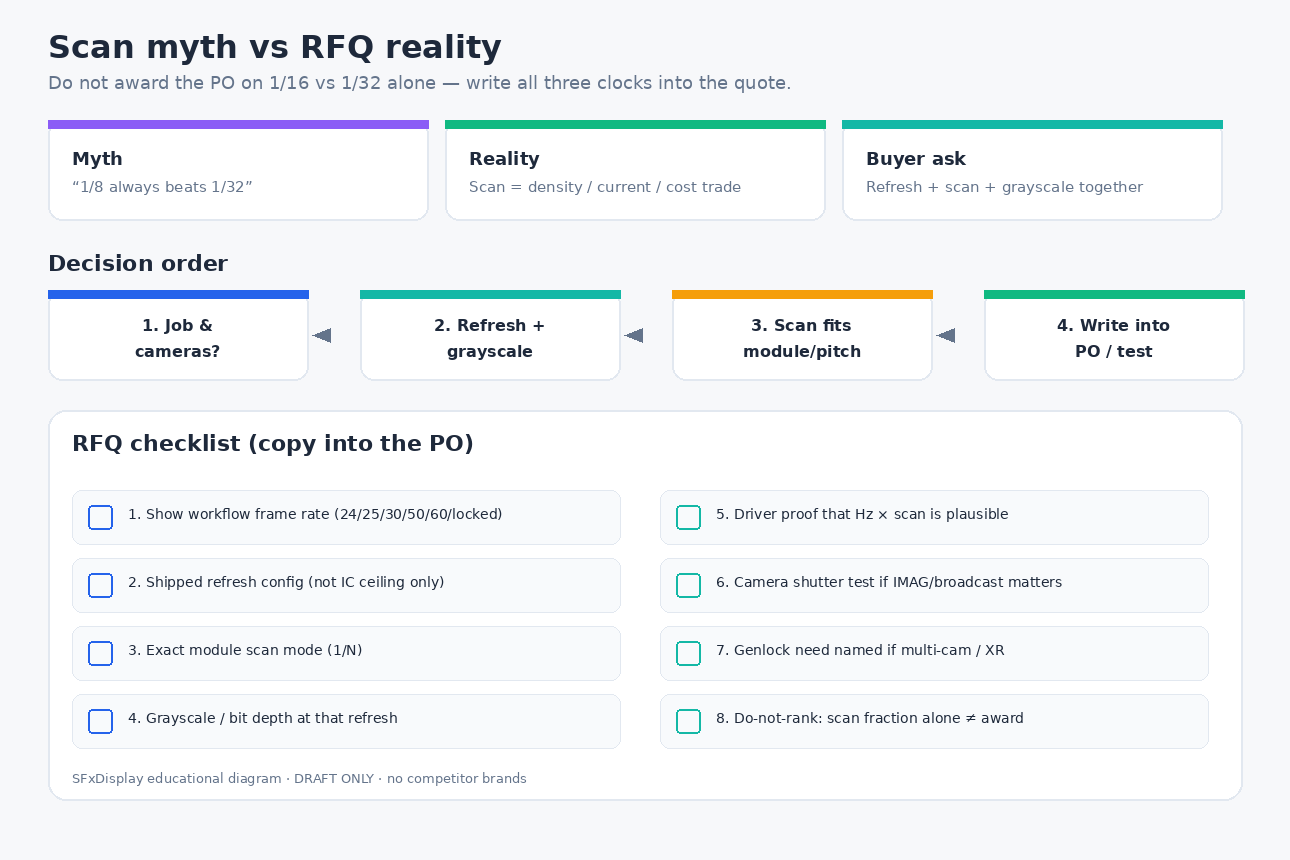
Ask for written answers, not brochure slogans:
- Frame rate of the show workflow (24 / 25 / 30 / 50 / 60 / locked) – content clock.
- Refresh rate of the shipped receiving-card config (not only the IC marketing ceiling).
- Scan mode (1/N) of the exact module on the PO.
- Grayscale / bit depth at that refresh – high-brush modes that drop bits must be named.
- Driver IC family (or equivalent proof) so refresh × scan claims are physically plausible.
- Camera test plan if IMAG / broadcast / social recap matters (shutters + mid/dark gray).
- Genlock / frame-lock requirement if multi-camera or XR (detail lives with the refresh / IMAG posts).
- Brightness target at the scan/refresh pair – especially outdoor.
- Do-not-rank clause: scan fraction will not be used as a sole award criterion.
- Honest opt-out: if the job is eyes-only at moderate brightness, write the simpler refresh tier and stop paying for trophy language.
Browse rental series and how to choose an LED display as starting points, then paste the checklist onto the PO.
How this sits next to related posts
| Post | Owns |
|---|---|
| This article | Frame vs refresh vs scan glossary, scan myth, three-clock RFQ |
| 3840Hz vs 7680Hz | Camera-facing refresh tiers + fake-Hz patterns |
| HDR vs SDR | Dynamic range / bit-depth chain – not scan multiplexing |
| Outdoor festival checklist | Full tour list: weather + power + hang + crew |
| How to choose | Broad selection framing |
| Rental P2.6 / P2.9 / P3.91 | Pitch choices once the clocks are clear |
| Sep-15 IMAG latency draft (pending) | Control / pipeline delay – different from scan architecture |
| Sep-19 fiber draft (pending) | Signal medium for long runs – different from temporal clocks |
What SFxDisplay can help with (honest scope)
We build rental and fixed LED cabinets and can help you read a quote’s fps / Hz / 1/N stack, map it to camera or eyes-only jobs, and write refresh + scan + grayscale language into the RFQ before the PO freezes. We can walk church / corporate / festival / stage geometry against the shutter package you will actually use.
We cannot turn a 30 fps source into 60 fps motion with panel Hertz alone, certify that a lower scan denominator always wins, or promise a brochure 7680 Hz that only exists at full white. Separate the three clocks, demand grayscale at the stated refresh, and test what the camera sees.
Bottom line
Frame rate is how often new pictures arrive. Refresh rate is how often the wall redraws the picture it has. Scan rate is how the module shares drive across rows. They work together; they are not one ladder. Do not award a PO on 1/16 vs 1/32 alone. Do not confuse 60 fps with 3840 Hz. Pair this glossary with our 3840 vs 7680 camera guide, write all three clocks into the RFQ, and spend the money where the audience – or the lens – will actually notice.
—

1 Comment
[…] after a spare install. Our live HDR vs SDR post owns HDR capability. Nits vs lumens owns units. Scan vs refresh vs frame rate owns timing / camera flicker. Spare parts & hot-swap owns what to stock. Here we answer the […]